
Log what you spend
Record purchases using the everyday spending categories. Add a description so you can recognise an entry when you review it.
Record the food shop, travel and everyday purchases in ClearWeek. See how the spending you log changes what is left in your weekly plan.
Free core expense tracking · Manual entry · No bank connection
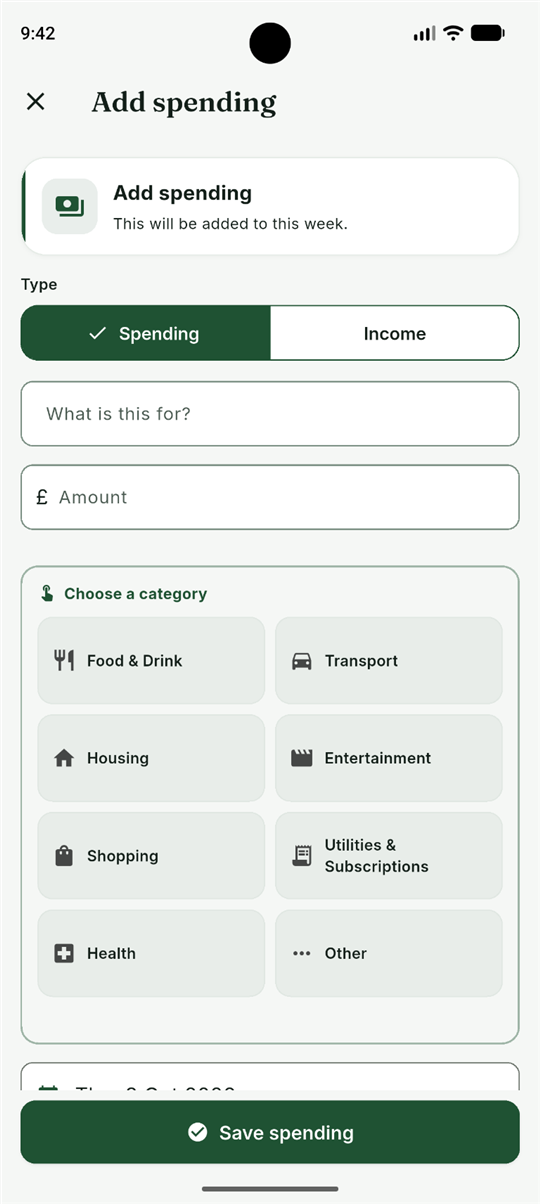
A spending record is most useful when you can act on it. ClearWeek pairs manual entries with the weekly budget they belong to.
Record purchases using the everyday spending categories. Add a description so you can recognise an entry when you review it.
Edit an entry or remove a duplicate. Your figures reflect the transactions you keep in the tracker.
Move between weeks to review recorded spending. Optional Premium adds deeper comparisons and longer-term views.
Log at the till or catch up later from receipts. The useful habit is keeping your entries current, not choosing the most complicated system.
Enter income, regular costs and any planned savings so everyday spending has a weekly starting point.
Use Log spending and enter the amount and category. For example, record a food shop under Food & Drink.
Review the available weekly amount before the next purchase, and correct any missing or mistaken entries.
Your weekly overview, manual expense and income entries, editing, deletion and previous-week history are part of the free core routine.
Optional Premium adds comparisons, planning tools and monthly or yearly views. You do not need to buy Premium simply to record everyday spending.
Calculate a starting weekly budget before logging purchases.
If rent is already included in the regular costs used to calculate the budget, do not also log it as everyday spending. The tracker reflects your entries, not an independently verified account balance.
Clear expectations before you start logging.
No. This is a manual expense tracker. You enter spending and income yourself; bank transactions do not appear automatically.
Yes. You can edit or remove entries. Correcting the original record keeps your spending history easier to understand.
No. It is a weekly budgeting figure calculated from your plan and recorded entries. Check your bank separately and keep the tracker up to date.
Yes. Core entries are stored locally on your device and no ClearWeek account or bank connection is required. See the privacy policy for details about exports, support and purchase services.
Get ClearWeek for Android and bring everyday spending into your weekly plan.